
Top 5: Best Gaming Mice Under $50 in 2026

Written by Branton

Last updated Jan 6, 2021

[cs_content][cs_section parallax=”false” separator_top_type=”none” separator_top_height=”50px” separator_top_inset=”0px” separator_top_angle_point=”50″ separator_bottom_type=”none” separator_bottom_height=”50px” separator_bottom_inset=”0px” separator_bottom_angle_point=”50″ _label=”Intro” style=”margin: 0px;padding: 0px 0px 10px;”][cs_row inner_container=”true” marginless_columns=”false” _label=”Row 1″ style=”margin: 0px auto;padding: 0px;”][cs_column fade=”false” fade_animation=”in” fade_animation_offset=”45px” fade_duration=”750″ _label=”1/1″ type=”1/1″ style=”padding: 0px;”][x_image type=”none” src=”http://pcgamehaven.com/wp-content/uploads/2015/07/best-gaming-mice-under-50-featured-image2018.jpg” alt=”best gaming mice under 50″ link=”false” href=”#” title=”” target=”” info=”none” info_place=”top” info_trigger=”hover” info_content=”” style=”display: block;margin: 0 auto;padding-bottom:15px;”][cs_text]

Having a great gaming PC is one thing, but if you don’t have a mouse that’s up to snuff, you’ll find yourself getting owned more than owning. That said, difference between a bad mouse, and a good mouse, is huge.

Picking the right mouse doesn’t just mean grabbing one that looks cool. To get the absolute best gaming experience, you need a mouse that caters to how you’re going to use it.

Picking the wrong mouse could actually lead to a lot of pain in your hand / wrist after extended gaming sessions, so it really pays to pick a good mouse.

With that out of the way, let’s get down to our list of the top 5 best gaming mice for under $50!

[/cs_text][cs_element_headline _id=”6″ ][cs_text]

  1. Redragon M601
  2. Logitech G300s
  3. Logitech G302 Daedalus
  4. Redragon M801 Mammoth
  5. HyperX Pulsefire FPS

[/cs_text][/cs_column][/cs_row][/cs_section][cs_section id=”number-5″ parallax=”false” separator_top_type=”none” separator_top_height=”50px” separator_top_inset=”0px” separator_top_angle_point=”50″ separator_bottom_type=”none” separator_bottom_height=”50px” separator_bottom_inset=”0px” separator_bottom_angle_point=”50″ _label=”Number 4″ style=”margin: 0px;padding: 10px 0px;”][cs_row inner_container=”true” marginless_columns=”false” _label=”Row 1″ style=”margin: 0px auto;padding: 0px;”][cs_column fade=”false” fade_animation=”in” fade_animation_offset=”45px” fade_duration=”750″ _label=”1/1″ type=”1/1″ style=”padding: 0px;”][x_custom_headline level=”h2″ looks_like=”h2″ accent=”true” id=”top5-rank” class=”cs-ta-left man”]#5[/x_custom_headline][x_gap size=”1em”][cs_element_headline _id=”13″ ][/cs_column][/cs_row][cs_row inner_container=”true” marginless_columns=”false” _label=”Row 2″ style=”margin: 0px auto;padding: 0px;”][cs_column fade=”false” fade_animation=”in” fade_animation_offset=”45px” fade_duration=”750″ _label=”1/2″ type=”1/2″ style=”padding: 0px;”][x_image type=”none” src=”http://pcgamehaven.com/wp-content/uploads/2015/07/redragon-m601.jpg” alt=”redragon m601gaming mouse” link=”false” href=”#” title=”” target=”” info=”none” info_place=”top” info_trigger=”hover” info_content=”” style=”display:block;margin: 0 auto;”][cs_element_headline _id=”17″ ][cs_element_button _id=”18″ ][/cs_column][cs_column fade=”false” fade_animation=”in” fade_animation_offset=”45px” fade_duration=”750″ _label=”1/2″ type=”1/2″ style=”padding: 0px;”][cs_text]

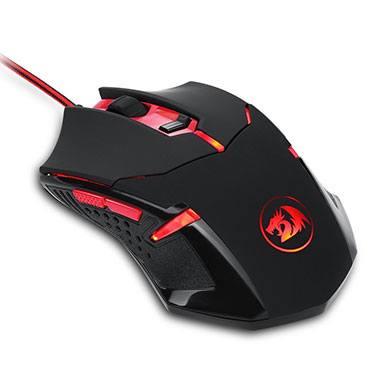
Redragon came onto the scene of PC gaming peripherals in 2012, since then, they’ve forged their own place in the market based on the goal to provide the best hardware at all price-points. However, the budget level is where they really shine.

The M601 uses a great Avago sensor which can switch between 2000-4000 DPI. The switches are made by Omron so you know they’re going to be quality as well. Finding these 2 features in a mouse that retails for just above $10 is very impressive to say the least.

It also allows you to customize it’s weight similarly to how the Logitech G502 does. The M601 is also boasting 3 extra buttons (total of 6), a braided cable, Omron switches for enhanced durability and a decent Avago sensor as I mentioned previously.

Some reviews have mentioned their M601 dying within 6-12 months, but also stating that it was the best 6-12 months they’ve had with a mouse. However, other reviews mention using this mouse for much longer than a year.

All-in-all, for a mouse that retails at just above $10, Redragon’s M601 is a seriously good deal.

[/cs_text][/cs_column][/cs_row][cs_row inner_container=”true” marginless_columns=”false” _label=”Row 3″ style=”margin: 0px auto;padding: 20px 0px 10px;”][cs_column fade=”false” fade_animation=”in” fade_animation_offset=”45px” fade_duration=”750″ _label=”1/3″ type=”1/3″ style=”padding: 0px;”][cs_element_headline _id=”23″ ][cs_text]

  • Great price point
  • Comfortable
  • Good Quality
  • 6 programmable buttons
  • Customizable weight

[/cs_text][/cs_column][cs_column fade=”false” fade_animation=”in” fade_animation_offset=”45px” fade_duration=”750″ _label=”1/3″ type=”1/3″ style=”padding: 0px;”][cs_element_headline _id=”26″ ][cs_text]

  • Some reviews mention it dying in 6-12 months ($1-$2/mo for a mouse is still pretty good in that case)
  • Backlighting is excessively bright

[/cs_text][/cs_column][cs_column fade=”false” fade_animation=”in” fade_animation_offset=”45px” fade_duration=”750″ _label=”1/3″ type=”1/3″ style=”padding: 0px;”][cs_element_headline _id=”29″ ][cs_text]

  • Sensor: Avago
  • Switches: Omron
  • Buttons: 6
  • Weight: 141g (with all weights)
  • Connection: USB

[/cs_text][/cs_column][/cs_row][cs_row inner_container=”true” marginless_columns=”false” _label=”Row 4″ class=”cs-hide-xl cs-hide-lg cs-hide-md” style=”margin: 0px auto;padding: 0px;”][cs_column fade=”false” fade_animation=”in” fade_animation_offset=”45px” fade_duration=”750″ _label=”1/1″ type=”1/1″ style=”padding: 0px;”][cs_element_button _id=”33″ ][/cs_column][/cs_row][/cs_section][cs_section id=”number-4″ parallax=”false” separator_top_type=”none” separator_top_height=”50px” separator_top_inset=”0px” separator_top_angle_point=”50″ separator_bottom_type=”none” separator_bottom_height=”50px” separator_bottom_inset=”0px” separator_bottom_angle_point=”50″ _label=”Number 3″ style=”margin: 0px;padding: 10px 0px;”][cs_row inner_container=”true” marginless_columns=”false” _label=”Row 1″ style=”margin: 0px auto;padding: 0px;”][cs_column fade=”false” fade_animation=”in” fade_animation_offset=”45px” fade_duration=”750″ _label=”1/1″ type=”1/1″ style=”padding: 0px;”][x_custom_headline level=”h2″ looks_like=”h2″ accent=”true” id=”top5-rank” class=”cs-ta-left man”]#4[/x_custom_headline][x_gap size=”1em”][cs_element_headline _id=”39″ ][/cs_column][/cs_row][cs_row inner_container=”true” marginless_columns=”false” _label=”Row 2″ style=”margin: 0px auto;padding: 0px;”][cs_column fade=”false” fade_animation=”in” fade_animation_offset=”45px” fade_duration=”750″ _label=”1/2″ type=”1/2″ style=”padding: 0px;”][x_image type=”none” src=”http://pcgamehaven.com/wp-content/uploads/2017/12/logitech-g300s.jpg” alt=”logitech g300s gaming mouse” link=”false” href=”#” title=”” target=”” info=”none” info_place=”top” info_trigger=”hover” info_content=”” style=”display:block;margin: 0 auto;”][cs_element_headline _id=”43″ ][cs_element_button _id=”44″ ][/cs_column][cs_column fade=”false” fade_animation=”in” fade_animation_offset=”45px” fade_duration=”750″ _label=”1/2″ type=”1/2″ style=”padding: 0px;”][cs_text]

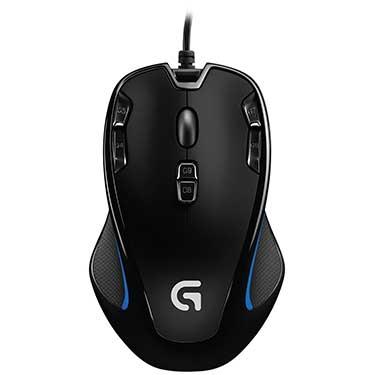
The Logitech G300s is a uniquely designed ambidextrous gaming mouse. It comes with a total of 9 programmable buttons and can easily be used by either hand.

Right off the bat I’m going to mention that this is a rather small mouse. If you have smaller hands, you’re probably going to really enjoy using it; but if you have bigger hands I would suggest looking at another mouse.

With that out of the way, the G300s is a great sub-$50 gaming mouse with only a couple of minor setbacks. One being the size we just talked about and the other being the button placement. The 4 buttons on the top of the mouse are positioned in such a way that they’re almost a nuisance.

Quality-wise, the G300s is definitely above average for the price. It’s coming with Omron switches and an Avago sensor that’s uncommon to see in a mouse of this level.

All-in-all, the G300s is a very comfortable mouse to use if you have smaller hands and don’t mind the button placement, but if you have bigger hands you’ll want to find a different mouse.

[/cs_text][/cs_column][/cs_row][cs_row inner_container=”true” marginless_columns=”false” _label=”Row 3″ style=”margin: 0px auto;padding: 20px 0px 10px;”][cs_column fade=”false” fade_animation=”in” fade_animation_offset=”45px” fade_duration=”750″ _label=”1/3″ type=”1/3″ style=”padding: 0px;”][cs_element_headline _id=”49″ ][cs_text]

  • 9 programmable buttons
  • Ambidextrous design
  • Great for small hands
  • Quality sensor and switches
  • Comfortable rubber grips

[/cs_text][/cs_column][cs_column fade=”false” fade_animation=”in” fade_animation_offset=”45px” fade_duration=”750″ _label=”1/3″ type=”1/3″ style=”padding: 0px;”][cs_element_headline _id=”52″ ][cs_text]

  • Mouse wheel feels cheap
  • Not good for big hands

[/cs_text][/cs_column][cs_column fade=”false” fade_animation=”in” fade_animation_offset=”45px” fade_duration=”750″ _label=”1/3″ type=”1/3″ style=”padding: 0px;”][cs_element_headline _id=”55″ ][cs_text]

  • Sensor: Pixart 3055
  • Switches: Omron
  • Buttons: 9
  • Weight: 81g
  • Connection: USB

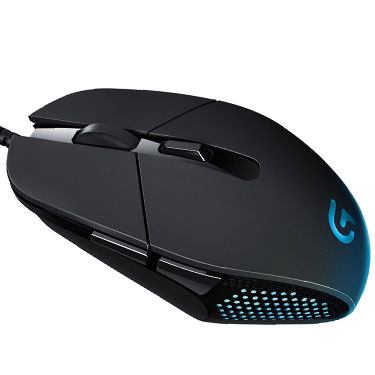
[/cs_text][/cs_column][/cs_row][cs_row inner_container=”true” marginless_columns=”false” _label=”Row 4″ class=”cs-hide-xl cs-hide-lg cs-hide-md” style=”margin: 0px auto;padding: 0px;”][cs_column fade=”false” fade_animation=”in” fade_animation_offset=”45px” fade_duration=”750″ _label=”1/1″ type=”1/1″ style=”padding: 0px;”][cs_element_button _id=”59″ ][/cs_column][/cs_row][/cs_section][cs_section id=”number-3″ parallax=”false” separator_top_type=”none” separator_top_height=”50px” separator_top_inset=”0px” separator_top_angle_point=”50″ separator_bottom_type=”none” separator_bottom_height=”50px” separator_bottom_inset=”0px” separator_bottom_angle_point=”50″ _label=”Number 2″ style=”margin: 0px;padding: 10px 0px;”][cs_row inner_container=”true” marginless_columns=”false” _label=”Row 1″ style=”margin: 0px auto;padding: 0px;”][cs_column fade=”false” fade_animation=”in” fade_animation_offset=”45px” fade_duration=”750″ _label=”1/1″ type=”1/1″ style=”padding: 0px;”][x_custom_headline level=”h2″ looks_like=”h2″ accent=”true” id=”top5-rank” class=”cs-ta-left man”]#3[/x_custom_headline][x_gap size=”1em”][cs_element_headline _id=”65″ ][/cs_column][/cs_row][cs_row inner_container=”true” marginless_columns=”false” _label=”Row 2″ style=”margin: 0px auto;padding: 0px;”][cs_column fade=”false” fade_animation=”in” fade_animation_offset=”45px” fade_duration=”750″ _label=”1/2″ type=”1/2″ style=”padding: 0px;”][x_image type=”none” src=”http://pcgamehaven.com/wp-content/uploads/2015/07/logitech-g306-daedalus.jpg” alt=”logitech g302 daedalus gaming mouse” link=”false” href=”#” title=”” target=”” info=”none” info_place=”top” info_trigger=”hover” info_content=”” style=”display:block;margin: 0 auto;”][cs_element_headline _id=”69″ ][cs_element_button _id=”70″ ][/cs_column][cs_column fade=”false” fade_animation=”in” fade_animation_offset=”45px” fade_duration=”750″ _label=”1/2″ type=”1/2″ style=”padding: 0px;”][cs_text]The G302 Daedalus Prime is considered a MOBA mouse, but it can honestly be used in any kind of game, and used well.

Featuring 6 programmable buttons, on the fly DPI switching, and a 4000dpi Delta Zero optical sensor, makes the G302 a great mouse for all types of gaming, not just MOBAs like DOTA2 or LOL.

With that said, the actual shape of the mouse might turn some people off, it kind of slants “in” on both sides, making the top a fair bit wider than the base. It also features some different angles which may be uncomfortable to some. Another downside is the simple fact that there are only 4 preset options between 240 and 4000 DPI to choose from, so it might not have the exact setting you’re looking for, but that can always be fixed up in-game.

Otherwise, if you like the shape & look, the G302 Daedalus Prime is a great gaming mouse for under $50![/cs_text][/cs_column][/cs_row][cs_row inner_container=”true” marginless_columns=”false” _label=”Row 3″ style=”margin: 0px auto;padding: 20px 0px 10px;”][cs_column fade=”false” fade_animation=”in” fade_animation_offset=”45px” fade_duration=”750″ _label=”1/3″ type=”1/3″ style=”padding: 0px;”][cs_element_headline _id=”75″ ][cs_text]

  • Quality materials
  • 1ms Report – No Input Lag
  • Braided cable
  • 6 Programmable Buttons

[/cs_text][/cs_column][cs_column fade=”false” fade_animation=”in” fade_animation_offset=”45px” fade_duration=”750″ _label=”1/3″ type=”1/3″ style=”padding: 0px;”][cs_element_headline _id=”78″ ][cs_text]

  • Uncomfortable For Some
  • Only 4 DPI Settings Between 240-4000DPI

[/cs_text][/cs_column][cs_column fade=”false” fade_animation=”in” fade_animation_offset=”45px” fade_duration=”750″ _label=”1/3″ type=”1/3″ style=”padding: 0px;”][cs_element_headline _id=”81″ ][cs_text]

  • Sensor: Delta Zero Optical Sensor
  • Switches: Omron
  • Buttons: 6
  • Weight: 204g
  • Connection: USB

[/cs_text][/cs_column][/cs_row][cs_row inner_container=”true” marginless_columns=”false” _label=”Row 4″ class=”cs-hide-xl cs-hide-lg cs-hide-md” style=”margin: 0px auto;padding: 0px;”][cs_column fade=”false” fade_animation=”in” fade_animation_offset=”45px” fade_duration=”750″ _label=”1/1″ type=”1/1″ style=”padding: 0px;”][cs_element_button _id=”85″ ][/cs_column][/cs_row][/cs_section][cs_section id=”number-2″ parallax=”false” separator_top_type=”none” separator_top_height=”50px” separator_top_inset=”0px” separator_top_angle_point=”50″ separator_bottom_type=”none” separator_bottom_height=”50px” separator_bottom_inset=”0px” separator_bottom_angle_point=”50″ _label=”Number 1″ style=”margin: 0px;padding: 10px 0px;”][cs_row inner_container=”true” marginless_columns=”false” _label=”Row 1″ style=”margin: 0px auto;padding: 0px;”][cs_column fade=”false” fade_animation=”in” fade_animation_offset=”45px” fade_duration=”750″ _label=”1/1″ type=”1/1″ style=”padding: 0px;”][x_custom_headline level=”h2″ looks_like=”h2″ accent=”true” id=”top5-rank” class=”cs-ta-left man”]#2[/x_custom_headline][x_gap size=”1em”][cs_element_headline _id=”91″ ][/cs_column][/cs_row][cs_row inner_container=”true” marginless_columns=”false” _label=”Row 2″ style=”margin: 0px auto;padding: 0px;”][cs_column fade=”false” fade_animation=”in” fade_animation_offset=”45px” fade_duration=”750″ _label=”1/2″ type=”1/2″ style=”padding: 0px;”][x_image type=”none” src=”http://pcgamehaven.com/wp-content/uploads/2015/10/redragon-m801-mammoth-gaming-mouse-front.jpg” alt=”redragon m801 mammoth gaming mouse” link=”false” href=”#” title=”” target=”” info=”none” info_place=”top” info_trigger=”hover” info_content=”” style=”display:block;margin: 0 auto;”][cs_element_headline _id=”95″ ][cs_element_button _id=”96″ ][/cs_column][cs_column fade=”false” fade_animation=”in” fade_animation_offset=”45px” fade_duration=”750″ _label=”1/2″ type=”1/2″ style=”padding: 0px;”][cs_text]

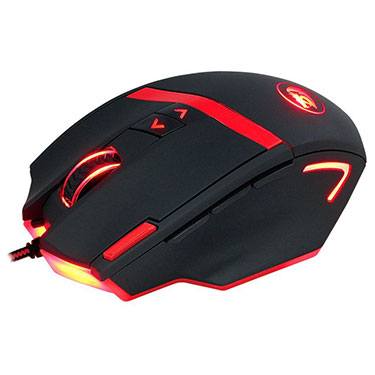
The Redragon M801 Mammoth is just that, a Mammoth. Featuring a 16400 DPI Avago sensor, durable Omron switches, 10 programmable buttons, and customizable weight adjustment system, there should be no wonder that it’s one of the best gaming mice under $50.

Redragon really struck gold when they developed the M801 Mammoth, other mice in this price range have an extremely difficult time competing with the level of quality. The sensor is one you would find in a much more expensive mouse, as are the Omron switches.

One downside is the software. It’s initially strange to use but after a while it becomes easier. However, this isn’t a tremendous downside. Not all of the lighting zones can be customized either, which is another negative.

At the end of the day, the M801 Mammoth is an awesome mouse, especially if you have bigger hands/like bigger mice. It gives you everything you could need in a gaming mouse and then some, all for an extremely reasonable price.

[/cs_text][/cs_column][/cs_row][cs_row inner_container=”true” marginless_columns=”false” _label=”Row 3″ style=”margin: 0px auto;padding: 20px 0px 10px;”][cs_column fade=”false” fade_animation=”in” fade_animation_offset=”45px” fade_duration=”750″ _label=”1/3″ type=”1/3″ style=”padding: 0px;”][cs_element_headline _id=”101″ ][cs_text]

  • Accurate
  • Inexpensive
  • Quality materials
  • Long lasting
  • 10 programmable buttons
  • Customizable weight

[/cs_text][/cs_column][cs_column fade=”false” fade_animation=”in” fade_animation_offset=”45px” fade_duration=”750″ _label=”1/3″ type=”1/3″ style=”padding: 0px;”][cs_element_headline _id=”104″ ][cs_text]

  • Strange software
  • Not all lighting zones can be customized

[/cs_text][/cs_column][cs_column fade=”false” fade_animation=”in” fade_animation_offset=”45px” fade_duration=”750″ _label=”1/3″ type=”1/3″ style=”padding: 0px;”][cs_element_headline _id=”107″ ][cs_text]

  • Sensor: Avago
  • Switches: Omron
  • Buttons: 10
  • Weight: 283g (with all weights)
  • Connection: USB

[/cs_text][/cs_column][/cs_row][cs_row inner_container=”true” marginless_columns=”false” _label=”Row 4″ class=”cs-hide-xl cs-hide-lg cs-hide-md” style=”margin: 0px auto;padding: 0px;”][cs_column fade=”false” fade_animation=”in” fade_animation_offset=”45px” fade_duration=”750″ _label=”1/1″ type=”1/1″ style=”padding: 0px;”][cs_element_button _id=”111″ ][/cs_column][/cs_row][/cs_section][cs_section id=”number-1″ parallax=”false” separator_top_type=”none” separator_top_height=”50px” separator_top_inset=”0px” separator_top_angle_point=”50″ separator_bottom_type=”none” separator_bottom_height=”50px” separator_bottom_inset=”0px” separator_bottom_angle_point=”50″ _label=”Number 5″ style=”margin: 0px;padding: 10px 0px;”][cs_row inner_container=”true” marginless_columns=”false” _label=”Row 1″ style=”margin: 0px auto;padding: 0px;”][cs_column fade=”false” fade_animation=”in” fade_animation_offset=”45px” fade_duration=”750″ _label=”1/1″ type=”1/1″ style=”padding: 0px;”][x_custom_headline level=”h2″ looks_like=”h2″ accent=”true” id=”top5-rank” class=”cs-ta-left man”]#1 [/x_custom_headline][x_gap size=”1em”][cs_element_headline _id=”117″ ][/cs_column][/cs_row][cs_row inner_container=”true” marginless_columns=”false” _label=”Row 2″ style=”margin: 0px auto;padding: 0px;”][cs_column fade=”false” fade_animation=”in” fade_animation_offset=”45px” fade_duration=”750″ _label=”1/2″ type=”1/2″ style=”padding: 0px;”][x_image type=”none” src=”http://pcgamehaven.com/wp-content/uploads/2017/12/hyperx-pulsefire-fps-gaming-mouse.jpg” alt=”hyperx pulsefire fps best gaming mouse under 50″ link=”false” href=”#” title=”” target=”” info=”none” info_place=”top” info_trigger=”hover” info_content=”” style=”display:block;margin: 0 auto;”][cs_element_headline _id=”121″ ][cs_element_button _id=”122″ ][/cs_column][cs_column fade=”false” fade_animation=”in” fade_animation_offset=”45px” fade_duration=”750″ _label=”1/2″ type=”1/2″ style=”padding: 0px;”][cs_text]

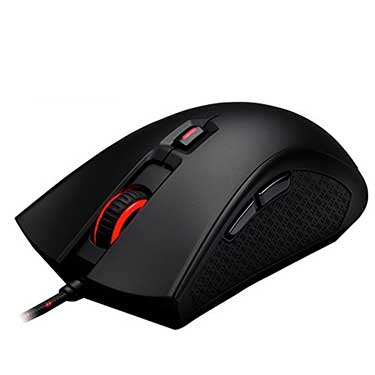
HyperX really outdid themselves with the Pulsefire FPS mouse, plain and simple. They’ve used high quality Omron switches, a Pixart 3310 sensor and even threw in a braided cable for $50. It’s very comparable to a Razer Deathadder except HyperX’s rubber grips are a step above in my opinion.

While testing the Pulsefire FPS, I played a ton of games in every genre to make sure it performed and didn’t start to break down after a few hours of hard use. I really only had one minor complaint about the middle mouse button’s switch being somewhat less “clicky” than the other 5 switches.

The overall design is very similar to a Razer Deathadder except for the Pulsfire’s added DPI toggle below the middle mouse button. Other than that, the Pulsefire FPS has larger rubber grips and a more “clicky” response when you actuate most buttons in comparison. That’s to say, the Pulsefire is really only good for palm grip – the HyperX Pulsefire Surge is much better for claw grip in comparison.

Performance-wise, the Puslefire FPS is great. HyperX used high quality switches and a great sensor inside of a well balanced shell and it resulted in a top notch gaming mouse.

All-in-all, HyperX’s Pulsefire FPS is an awesome choice in the sub $50 price range, or even if you’re considering higher priced mice and just want high quality components. It doesn’t have RGB lighting, but the Pulsefire FPS makes up for that in sheer quality.

[/cs_text][/cs_column][/cs_row][cs_row inner_container=”true” marginless_columns=”false” _label=”Row 3″ style=”margin: 0px auto;padding: 20px 0px 10px;”][cs_column fade=”false” fade_animation=”in” fade_animation_offset=”45px” fade_duration=”750″ _label=”1/3″ type=”1/3″ style=”padding: 0px;”][cs_element_headline _id=”127″ ][cs_text]

  • Solid wireless connection
  • 6 Buttons
  • Teflon feet
  • High-quality switches & sensor
  • Insanely low price

[/cs_text][/cs_column][cs_column fade=”false” fade_animation=”in” fade_animation_offset=”45px” fade_duration=”750″ _label=”1/3″ type=”1/3″ style=”padding: 0px;”][cs_element_headline _id=”130″ ][cs_text]

  • Only good for palm grip

[/cs_text][/cs_column][cs_column fade=”false” fade_animation=”in” fade_animation_offset=”45px” fade_duration=”750″ _label=”1/3″ type=”1/3″ style=”padding: 0px;”][cs_element_headline _id=”133″ ][cs_text]

  • Sensor: Pixart 3310
  • Switches: Omron
  • Buttons: 6
  • Weight: 95g
  • Connection: USB

[/cs_text][/cs_column][/cs_row][cs_row inner_container=”true” marginless_columns=”false” _label=”Row 4″ class=”cs-hide-xl cs-hide-lg cs-hide-md” style=”margin: 0px auto;padding: 0px;”][cs_column fade=”false” fade_animation=”in” fade_animation_offset=”45px” fade_duration=”750″ _label=”1/1″ type=”1/1″ style=”padding: 0px;”][cs_element_button _id=”137″ ][/cs_column][/cs_row][/cs_section][cs_section parallax=”false” separator_top_type=”none” separator_top_height=”50px” separator_top_inset=”0px” separator_top_angle_point=”50″ separator_bottom_type=”none” separator_bottom_height=”50px” separator_bottom_inset=”0px” separator_bottom_angle_point=”50″ _label=”Conclusion” style=”margin: 0px;padding: 10px 0px;”][cs_row inner_container=”true” marginless_columns=”false” _label=”Row 1″ style=”margin: 0px auto;padding: 0px;”][cs_column fade=”false” fade_animation=”in” fade_animation_offset=”45px” fade_duration=”750″ _label=”1/1″ type=”1/1″ style=”padding: 0px;”][cs_element_headline _id=”141″ ][cs_text]When it comes to picking the right mouse, most people don’t need to spend any more than $50 to get what they need. As you can see, mice in this price range still come with high-quality switches & sensors, it’s just knowing which ones to go for!

Either way, this list should help provide you a base on where to start looking, or hopefully it provided you with the exact mouse you needed! If nothing else, you should have a good idea of what gaming mice are good for gaming for under $50!

Yes, this list only consists of Logitech & Redragon mice, but out of all the mice I tested in this price bracket, they proved to be the all-around best. If you want to see more of a selection from a wider array of brands, check out my Top 5 under $100 list.

If you have any questions, comments, or concerns, feel free to leave them below![/cs_text][/cs_column][/cs_row][/cs_section][/cs_content][cs_content_seo]Having a great gaming PC is one thing, but if you don’t have a mouse that’s up to snuff, you’ll find yourself getting owned more than owning. That said, difference between a bad mouse, and a good mouse, is huge.
Picking the right mouse doesn’t just mean grabbing one that looks cool. To get the absolute best gaming experience, you need a mouse that caters to how you’re going to use it.
Picking the wrong mouse could actually lead to a lot of pain in your hand / wrist after extended gaming sessions, so it really pays to pick a good mouse.
With that out of the way, let’s get down to our list of the top 5 best gaming mice for under $50!

Best Gaming Mice under $50

Redragon M601
Logitech G300s
Logitech G302 Daedalus
Redragon M801 Mammoth
HyperX Pulsefire FPS

#5

Redragon M601

At Amazon

Get Yours

Redragon came onto the scene of PC gaming peripherals in 2012, since then, they’ve forged their own place in the market based on the goal to provide the best hardware at all price-points. However, the budget level is where they really shine.
The M601 uses a great Avago sensor which can switch between 2000-4000 DPI. The switches are made by Omron so you know they’re going to be quality as well. Finding these 2 features in a mouse that retails for just above $10 is very impressive to say the least.
It also allows you to customize it’s weight similarly to how the Logitech G502 does. The M601 is also boasting 3 extra buttons (total of 6), a braided cable, Omron switches for enhanced durability and a decent Avago sensor as I mentioned previously.
Some reviews have mentioned their M601 dying within 6-12 months, but also stating that it was the best 6-12 months they’ve had with a mouse. However, other reviews mention using this mouse for much longer than a year.
All-in-all, for a mouse that retails at just above $10, Redragon’s M601 is a seriously good deal.

The Good

Great price point
Comfortable
Good Quality
6 programmable buttons
Customizable weight

The Bad

Some reviews mention it dying in 6-12 months ($1-$2/mo for a mouse is still pretty good in that case)
Backlighting is excessively bright

Specs

Sensor: Avago
Switches: Omron
Buttons: 6
Weight: 141g (with all weights)
Connection: USB

Get Yours

#4

Logitech G300s

At Amazon

Get Yours

The Logitech G300s is a uniquely designed ambidextrous gaming mouse. It comes with a total of 9 programmable buttons and can easily be used by either hand.
Right off the bat I’m going to mention that this is a rather small mouse. If you have smaller hands, you’re probably going to really enjoy using it; but if you have bigger hands I would suggest looking at another mouse.
With that out of the way, the G300s is a great sub-$50 gaming mouse with only a couple of minor setbacks. One being the size we just talked about and the other being the button placement. The 4 buttons on the top of the mouse are positioned in such a way that they’re almost a nuisance.
Quality-wise, the G300s is definitely above average for the price. It’s coming with Omron switches and an Avago sensor that’s uncommon to see in a mouse of this level.
All-in-all, the G300s is a very comfortable mouse to use if you have smaller hands and don’t mind the button placement, but if you have bigger hands you’ll want to find a different mouse.

The Good

9 programmable buttons
Ambidextrous design
Great for small hands
Quality sensor and switches
Comfortable rubber grips

The Bad

Mouse wheel feels cheap
Not good for big hands

Specs

Sensor: Pixart 3055
Switches: Omron
Buttons: 9
Weight: 81g
Connection: USB

Get Yours

#3

Logitech G302 Daedalus

At Amazon

Get Yours

The G302 Daedalus Prime is considered a MOBA mouse, but it can honestly be used in any kind of game, and used well.
Featuring 6 programmable buttons, on the fly DPI switching, and a 4000dpi Delta Zero optical sensor, makes the G302 a great mouse for all types of gaming, not just MOBAs like DOTA2 or LOL.
With that said, the actual shape of the mouse might turn some people off, it kind of slants “in” on both sides, making the top a fair bit wider than the base. It also features some different angles which may be uncomfortable to some. Another downside is the simple fact that there are only 4 preset options between 240 and 4000 DPI to choose from, so it might not have the exact setting you’re looking for, but that can always be fixed up in-game.
Otherwise, if you like the shape & look, the G302 Daedalus Prime is a great gaming mouse for under $50!

The Good

Quality materials
1ms Report – No Input Lag
Braided cable
6 Programmable Buttons

The Bad

Uncomfortable For Some
Only 4 DPI Settings Between 240-4000DPI

Specs

Sensor: Delta Zero Optical Sensor
Switches: Omron
Buttons: 6
Weight: 204g
Connection: USB

Get Yours

#2

Redragon M801 Mammoth

At Amazon

Get Yours

The Redragon M801 Mammoth is just that, a Mammoth. Featuring a 16400 DPI Avago sensor, durable Omron switches, 10 programmable buttons, and customizable weight adjustment system, there should be no wonder that it’s one of the best gaming mice under $50.
Redragon really struck gold when they developed the M801 Mammoth, other mice in this price range have an extremely difficult time competing with the level of quality. The sensor is one you would find in a much more expensive mouse, as are the Omron switches.
One downside is the software. It’s initially strange to use but after a while it becomes easier. However, this isn’t a tremendous downside. Not all of the lighting zones can be customized either, which is another negative.
At the end of the day, the M801 Mammoth is an awesome mouse, especially if you have bigger hands/like bigger mice. It gives you everything you could need in a gaming mouse and then some, all for an extremely reasonable price.

The Good

Accurate
Inexpensive
Quality materials
Long lasting
10 programmable buttons
Customizable weight

The Bad

Strange software
Not all lighting zones can be customized

Specs

Sensor: Avago
Switches: Omron
Buttons: 10
Weight: 283g (with all weights)
Connection: USB

Get Yours

#1

HyperX Plusefire FPS

At Amazon

Get Yours

HyperX really outdid themselves with the Pulsefire FPS mouse, plain and simple. They’ve used high quality Omron switches, a Pixart 3310 sensor and even threw in a braided cable for $50. It’s very comparable to a Razer Deathadder except HyperX’s rubber grips are a step above in my opinion.
While testing the Pulsefire FPS, I played a ton of games in every genre to make sure it performed and didn’t start to break down after a few hours of hard use. I really only had one minor complaint about the middle mouse button’s switch being somewhat less “clicky” than the other 5 switches.
The overall design is very similar to a Razer Deathadder except for the Pulsfire’s added DPI toggle below the middle mouse button. Other than that, the Pulsefire FPS has larger rubber grips and a more “clicky” response when you actuate most buttons in comparison. That’s to say, the Pulsefire is really only good for palm grip – the HyperX Pulsefire Surge is much better for claw grip in comparison.
Performance-wise, the Puslefire FPS is great. HyperX used high quality switches and a great sensor inside of a well balanced shell and it resulted in a top notch gaming mouse.
All-in-all, HyperX’s Pulsefire FPS is an awesome choice in the sub $50 price range, or even if you’re considering higher priced mice and just want high quality components. It doesn’t have RGB lighting, but the Pulsefire FPS makes up for that in sheer quality.

The Good

Solid wireless connection
6 Buttons
Teflon feet
High-quality switches & sensor
Insanely low price

The Bad

Only good for palm grip

Specs

Sensor: Pixart 3310
Switches: Omron
Buttons: 6
Weight: 95g
Connection: USB

Get Yours

Conclusion
When it comes to picking the right mouse, most people don’t need to spend any more than $50 to get what they need. As you can see, mice in this price range still come with high-quality switches & sensors, it’s just knowing which ones to go for!
Either way, this list should help provide you a base on where to start looking, or hopefully it provided you with the exact mouse you needed! If nothing else, you should have a good idea of what gaming mice are good for gaming for under $50!
Yes, this list only consists of Logitech & Redragon mice, but out of all the mice I tested in this price bracket, they proved to be the all-around best. If you want to see more of a selection from a wider array of brands, check out my Top 5 under $100 list.
If you have any questions, comments, or concerns, feel free to leave them below!best gaming mice under 50redragon m601gaming mouselogitech g300s gaming mouselogitech g302 daedalus gaming mouseredragon m801 mammoth gaming mousehyperx pulsefire fps best gaming mouse under 50[/cs_content_seo]

0 0 votes
Article Rating

9 Comments
guest
9 Comments
Inline Feedbacks
View all comments
The person who asked the ssd question
March 28, 2020 2:35 pm

Is the g502 hero a good option?

The person who asked the ssd question
April 14, 2020 10:48 am
Reply to  Branton

Thank you

Anonymous
Anonymous
June 3, 2019 3:45 pm

What about MSI?

Anonymous
Anonymous
March 6, 2019 6:58 am

Can you do a review on the Steelseries Rival 310. I have been thinking on getting a good budget gaming mouse and that one as been on top of my list the past couple weeks.
Thanks!

Situ
Situ
January 21, 2017 2:48 am

Thanks for the website infact i even made a video about this website to give you some credit

Milos
Milos
October 16, 2016 12:41 pm

What do you think about Roccat Lua or Steel Series Rival 100?

Related Articles

The Best Gaming PC Build for $800 in 2026

The Best Gaming PC Build for $800 in 2026

Best $800 Gaming PC Build for 2026 The $800 sweet spot has always been where PC gaming builds shine brightest, and 2026 is no different. With the Ryzen 5 9600X now available in the $199 range and the RTX 4060 sitting at $299, you can put together a machine that...

The Best Gaming PC Build for $800 in 2026

The Best Gaming PC Build for $800 in 2026

Best $800 Gaming PC Build for 2026 The $800 sweet spot has always been where PC gaming builds shine brightest, and 2026 is no different. With the Ryzen 5 9600X now available in the $199 range and the RTX 4060 sitting at $299, you can put together a machine that...

The Best Gaming PC Build for $800 in 2026

The Best Gaming PC Build for $800 in 2026

Best $800 Gaming PC Build for 2026 The $800 sweet spot has always been where PC gaming builds shine brightest, and 2026 is no different. With the Ryzen 5 9600X now available in the $199 range and the RTX 4060 sitting at $299, you can put together a machine that...