Razer BlackWidow Chroma – Review

Written by Branton

Last updated Feb 14, 2020

[cs_content][cs_section parallax=”false” separator_top_type=”none” separator_top_height=”50px” separator_top_angle_point=”50″ separator_bottom_type=”none” separator_bottom_height=”50px” separator_bottom_angle_point=”50″ style=”margin: 0px;padding: 15px 0px 5px;”][cs_row inner_container=”true” marginless_columns=”false” style=”margin: 0px auto;padding: 0px;”][cs_column fade=”false” fade_animation=”in” fade_animation_offset=”45px” fade_duration=”750″ type=”1/1″ style=”padding: 0px;”][cs_text]If you’re a fan of mechanical keyboards and RGB lighting, the Razer BlackWidow Chroma is definitely a keyboard you’re going to want to check out!

I’ve owned the BlackWidow Chroma for quite a while now, and over my time using it I’ve had ample time to experience all of its pros and cons, so now it’s time for a review![/cs_text][x_custom_headline level=”h2″ looks_like=”h4″ accent=”false” class=”cs-ta-center man”]Razer BlackWidow Chroma[/x_custom_headline][/cs_column][/cs_row][/cs_section][cs_section bg_color=”#ffffff” parallax=”false” separator_top_type=”none” separator_top_height=”50px” separator_top_angle_point=”50″ separator_bottom_type=”none” separator_bottom_height=”50px” separator_bottom_angle_point=”50″ style=”margin: 0px;padding: 25px 0px;”][cs_row inner_container=”true” marginless_columns=”false” style=”margin: 0px auto;padding: 0px;”][cs_column fade=”false” fade_animation=”in” fade_animation_offset=”45px” fade_duration=”750″ type=”2/3″ class=”cs-ta-center” style=”padding: 0px;”][x_slider animation=”fade” slide_time=”5000″ slide_speed=”1000″ slideshow=”false” random=”false” control_nav=”false” prev_next_nav=”true” no_container=”true” class=”man”][x_slide]Razer BlackWidow Chroma Review 1[/x_slide][x_slide]Razer BlackWidow Chroma Review 3[/x_slide][x_slide]Razer BlackWidow Chroma Review 4[/x_slide][/x_slider][/cs_column][cs_column fade=”false” fade_animation=”in” fade_animation_offset=”45px” fade_duration=”750″ type=”1/3″ style=”padding: 0px;”][x_skill_bar heading=”Switches” percent=”85%” bar_text=”” bar_bg_color=”” class=”man”][x_gap size=”20px”][x_skill_bar heading=”Comfort” percent=”85%” bar_text=”” bar_bg_color=”” class=”man”][x_gap size=”20px”][x_skill_bar heading=”Backlighting” percent=”90%” bar_text=”” bar_bg_color=”” class=”man”][x_gap size=”20px”][x_skill_bar heading=”Durability” percent=”85%” bar_text=”” bar_bg_color=”” class=”man”][x_gap size=”20px”][x_skill_bar heading=”Overall” percent=”86%” bar_text=”” bar_bg_color=”” class=”man”][x_gap size=”20px”][x_line style=”border-top-width: 1px;”][cs_text class=”cs-ta-center” style=”font-size: 25px;font-weight:600;”]

[amazon-element asin=”B01NAEDGWM” fields=”LowestNewPrice”]At Amazon

[/cs_text][x_gap size=”20px”][x_button size=”x-large” block=”true” circle=”false” icon_only=”false” href=”https://www.amazon.com/Razer-BlackWidow-Chroma-Mechanical-Keyboard/dp/B00MTWV0II/ref=as_li_ss_tl?ie=UTF8&linkCode=sl1&tag=websitepcgame-20&linkId=039ab42e9d73bb711ec599ce7508532c” title=”” target=”blank” info=”none” info_place=”top” info_trigger=”hover” info_content=””][x_icon type=”thumbs-up” class=”mvn mln mrs”]Get Yours![/x_button][x_gap size=”45px” class=”cs-hide-xl cs-hide-lg cs-hide-md”][/cs_column][/cs_row][/cs_section][cs_section parallax=”false” separator_top_type=”none” separator_top_height=”50px” separator_top_angle_point=”50″ separator_bottom_type=”none” separator_bottom_height=”50px” separator_bottom_angle_point=”50″ style=”margin: 0px;padding: 15px 0px;”][cs_row inner_container=”true” marginless_columns=”false” style=”margin: 0px auto;padding: 0px;”][cs_column fade=”false” fade_animation=”in” fade_animation_offset=”45px” fade_duration=”750″ type=”1/3″ style=”padding: 0px;”][cs_element_headline _id=”41″][cs_icon_list title=”Copy of Copy of undefined”][cs_icon_list_item title=”USB port & audio jacks built in” type=”check” link_enabled=”false” link_url=”#” link_new_tab=”false”]USB port & audio jacks built in[/cs_icon_list_item][cs_icon_list_item title=”Great RGB customization options” type=”check” link_enabled=”false” link_url=”#” link_new_tab=”false”]Great RGB customization options[/cs_icon_list_item][cs_icon_list_item title=”Comfortable to use” type=”check” link_enabled=”false” link_url=”#” link_new_tab=”false”]Comfortable to use[/cs_icon_list_item][cs_icon_list_item title=”Still feels like-new after 6 months of use” type=”check” link_enabled=”false” link_url=”#” link_new_tab=”false”]Still feels like-new after 6 months of use[/cs_icon_list_item][cs_icon_list_item title=”Razer Synapse integration in some games” type=”check” link_enabled=”false” link_url=”#” link_new_tab=”false”]Razer Synapse integration in some games[/cs_icon_list_item][/cs_icon_list][/cs_column][cs_column fade=”false” fade_animation=”in” fade_animation_offset=”45px” fade_duration=”750″ type=”1/3″ style=”padding: 0px;”][cs_element_headline _id=”49″][cs_icon_list title=”Copy of undefined”][cs_icon_list_item title=”Entirely plastic construction” type=”remove” link_enabled=”false” link_url=”#” link_new_tab=”false”]Entirely plastic construction[/cs_icon_list_item][cs_icon_list_item title=”Very dim lighting for icons above numpad” type=”remove” link_enabled=”false” link_url=”#” link_new_tab=”false”]Very dim lighting for icons above numpad[/cs_icon_list_item][/cs_icon_list][/cs_column][cs_column fade=”false” fade_animation=”in” fade_animation_offset=”45px” fade_duration=”750″ type=”1/3″ style=”padding: 0px;”][cs_element_headline _id=”54″][cs_text]If you’re a fan of mechanical keyboards and RGB lighting, the Razer BlackWidow Chroma is definitely a keyboard you’re going to want to check out![/cs_text][/cs_column][/cs_row][cs_row inner_container=”true” marginless_columns=”false” style=”margin: 0px auto;padding: 0px;”][cs_column fade=”false” fade_animation=”in” fade_animation_offset=”90px” fade_duration=”750″ type=”1/1″ style=”padding: 0px;”][cs_element_headline _id=”61″][cs_text]

  • Switches by: Kailh
  • Size: Full size / 18.52 x 7.17 x 1.54 in
  • Weight: 3.31 lbs
  • Cable length and type: 1.2m, Braided
  • Connection:  USB / Dual 3.5mm jacks

[/cs_text][/cs_column][/cs_row][/cs_section][cs_section parallax=”false” separator_top_type=”none” separator_top_height=”50px” separator_top_angle_point=”50″ separator_bottom_type=”none” separator_bottom_height=”50px” separator_bottom_angle_point=”50″ style=”margin: 0px;padding: 5px 0px;”][cs_row inner_container=”true” marginless_columns=”false” style=”margin: 0px auto;padding: 0px;”][cs_column fade=”false” fade_animation=”in-from-bottom” fade_animation_offset=”45px” fade_duration=”750″ type=”1/1″ style=”padding: 0px;”][x_custom_headline level=”h2″ looks_like=”h3″ accent=”true” class=”man”]Details[/x_custom_headline][cs_text]I picked myself up a Razer BlackWidow Chroma in the middle of 2016 to test out Razer’s mechanical switches (made by Kailh) and so I could get a good feel of how the BlackWidow Chroma works and feels.

I had initially planned on writing this a long time ago, but I started to like the BlackWidow so much that I actually forgot I bought it to review and I’ve been using it ever since!

Since then the BlackWidow Chroma V2 has released, but I haven’t had a chance to get my hands on one yet. You can expect to see that review sooner than later.

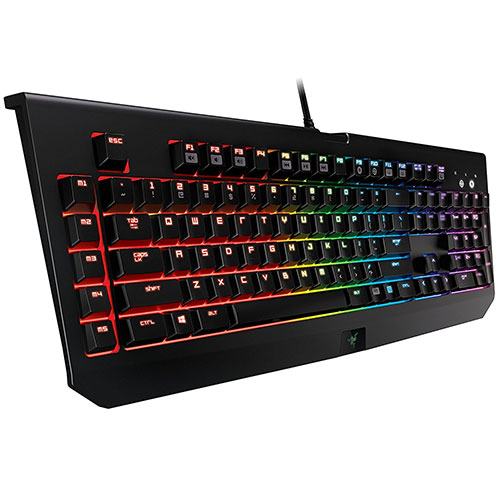
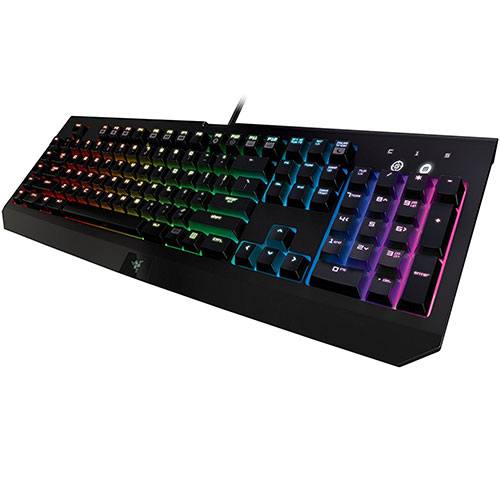
The overall design is relatively minimalist and the BlackWidow omits a lot of the typical “flair” to offer a cleaner, more classic look. You can find 3.5mm headphone and microphone jacks + a USB port along the numpad side, but keep in mind these will require more connections to your PC than the typical single USB. Personally, I would have preferred to see these auxiliary ports on the other side, or along the top, as they tend to get in the way of my mouse.
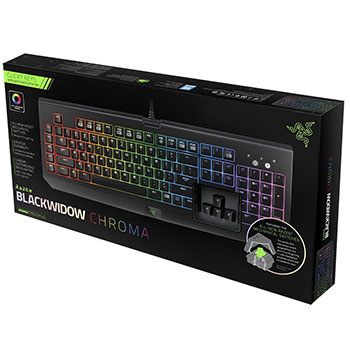
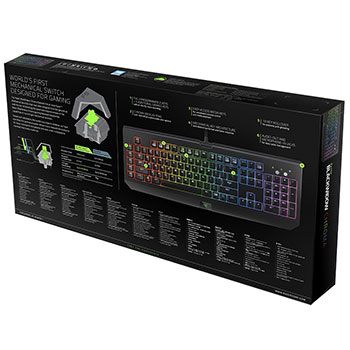
As far as RGB lighting goes, Razer’s Chroma-enabled products are some of the absolute best options you have. Their proprietary software Razer Synapse is super intuitive and easy to use especially when compared to Corsair’s CUE software that you would have to use for something like the K70 RGB Rapidfire. The sheer level of customization is absolutely endless and there’s pretty much no “light show” you can’t create, or simply download.

I’ll go over this more in the performance section, but Razer’s mechanical switches are really decent. I’m sure you can imagine that I have to type A LOT to run PC Game Haven, I’ve definitely put the BlackWidow through more keystrokes over the past 6 months than most people will in 2 years. I haven’t experienced any consistency issues with the keys, nor have I run into any other major flaws.[/cs_text][x_custom_headline level=”h3″ looks_like=”h4″ accent=”false”]Design[/x_custom_headline][cs_text title=”Copy of undefined”]The design of the BlackWidow Chroma is something that I think is going to appeal to the vast majority of us. It’s a classic layout offering little in the way of excessive design choices and only giving you what you need.

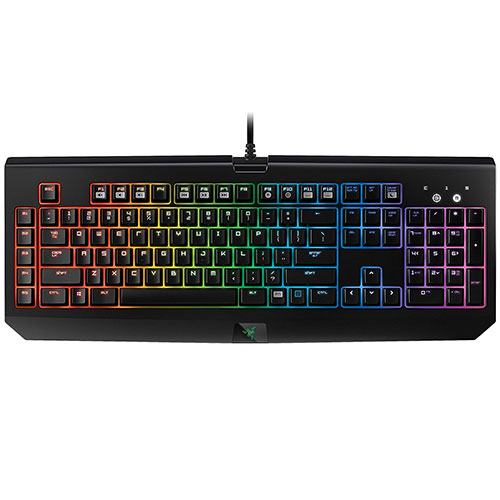
Razer decided to add only 1 extra to the BlackWidow, that’s an extra 5 “M” keys along the left side that you can program to do anything you want; I usually use these keys for in-game key bindings that default to 6-0, but not much else. There are no dedicated media keys, but F1-F7 have alternate media functions which is definitely a common feature to see anymore.

One thing that I’m hugely disappointed by, as small as it might be, is how horribly dim & muddy looking the display above the numpad is. Unless you’re looking straight down on the icons you can hardly tell if they’re even lit up, or not. This is something that was addressed and fixed in the BlackWidow Chroma V2, but on the V1 it’s a relatively annoying flaw.

Razer BlackWidow Chroma Review 1Luckily, the actual RGB LED backlighting doesn’t suffer from the same problem and is absolutely great. The tray below the keys is white instead of the traditional black/dark gray, which really helps to make any color of LED “pop” way more than against a dark backdrop. Like I said before, the level of customization with the backlighting is literally limitless.

Being built almost entirely out of plastic and having a matte finish, the BlackWidow Chroma has a tendency to pick up and display and of that awesome hand-sweat that might build up after a few hours of gaming. This can look relatively unappealing but nothing a quick rub down with a cloth won’t fix.

Overall, there aren’t many downsides when it comes to the general design of the BlackWidow Chroma, and any that I was able to find have been rectified in the newer V2 model, which also comes with a significantly higher price tag.. It offers some of the best RGB backlighting you can get right now and what I think is the most intuitive software.[/cs_text][x_custom_headline level=”h3″ looks_like=”h4″ accent=”false”]Performance[/x_custom_headline][cs_text title=”Copy of Copy of undefined”]As far as performance goes, the BlackWidow Chroma delivers. It doesn’t use Cherry MX switches, but the switches it does use are still very comparable and feel great to use. I also have a Logitech G810 with Romer-G switches and a Corsair K70 with Cherry MX Browns and another BlackWidow with Cherry MX blues, and I have to say that I really prefer Razer’s Green switches.

The switches offer a responsive, tactile bump at the actuation point which is great; they sound very similar to Cherry MX Blue while feeling more like Cherry MX Green, in my opinion.
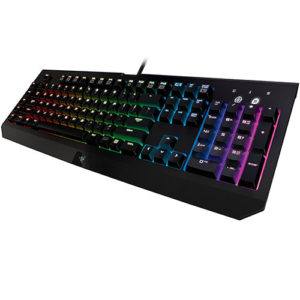
Razer BlackWidow Chroma Review 3I’ve typed A LOT on this keyboard over the past 6 months or so, and I can confidently say that I’ve not experienced any degradation in performance at all. Each key feels like it did the day I bought it, which is exactly what one would expect out of a mechanical keyboard. I also haven’t noticed any inconsistency issues between keys, which is something others have definitely mentioned.

All-in-all, the performance is exactly what you would expect from a keyboard at this level. Razer’s mechanical switches (which are made by Kailh) are definitely not as bad as some people would make them out to seem and I’ve really enjoyed using them.[/cs_text][x_custom_headline level=”h2″ looks_like=”h3″ accent=”true”]Conclusion[/x_custom_headline][cs_text title=”Copy of undefined”]At the end of the day, Razer’s BlackWidow Chroma is still a great keyboard in the sub-$150 bracket. There’s a newer V2 model that’s recently been released, but it’s more in the $170 range currently.

If you’re looking for amazing RGB customization potential and great mechanical keys with a clicky, tactile profile, the BlackWidow Chroma is definitely a keyboard you should keep in mind! For the couple of flaws it has, there are dozens of reasons why it’s an awesome keyboard.[/cs_text][/cs_column][/cs_row][/cs_section][cs_section parallax=”false” separator_top_type=”none” separator_top_height=”50px” separator_top_angle_point=”50″ separator_bottom_type=”none” separator_bottom_height=”50px” separator_bottom_angle_point=”50″ class=”cs-hide-xs” style=”margin: 0px;padding: 5px 0px;margin: 0 auto;”][cs_row inner_container=”true” marginless_columns=”false” style=”margin: 0px auto;padding: 0px;”][cs_column fade=”false” fade_animation=”in-from-bottom” fade_animation_offset=”45px” fade_duration=”750″ type=”1/1″ style=”padding: 0px;”][x_callout title=”Razer BlackWidow Chroma<br> Gaming Keyboard” message=”- Amazing RGB customization<br> – Great tactile feedback and responsiveness!<br><strong>8.6 / 10</strong>” type=”center” button_text=”Get Yours!” circle=”false” button_icon=”thumbs-up” href=”https://www.amazon.com/Razer-BlackWidow-Chroma-Mechanical-Keyboard/dp/B00MTWV0II/ref=as_li_ss_tl?ie=UTF8&linkCode=sl1&tag=websitepcgame-20&linkId=039ab42e9d73bb711ec599ce7508532c” href_title=”” target=”blank”][/cs_column][/cs_row][/cs_section][cs_section parallax=”false” separator_top_type=”none” separator_top_height=”50px” separator_top_angle_point=”50″ separator_bottom_type=”none” separator_bottom_height=”50px” separator_bottom_angle_point=”50″ class=”cs-hide-xl cs-hide-lg cs-hide-md cs-hide-sm” style=”margin: 0px;padding: 5px 0px 45px;”][cs_row inner_container=”true” marginless_columns=”false” style=”margin: 0px auto;padding: 0px;”][cs_column fade=”false” fade_animation=”in” fade_animation_offset=”45px” fade_duration=”750″ type=”1/1″ style=”padding: 0px;”][x_image type=”none” src=”http://pcgamehaven.com/wp-content/uploads/2017/02/Razer-BlackWidow-Chroma-Review-4.jpg” alt=”” link=”false” href=”#” title=”” target=”” info=”none” info_place=”top” info_trigger=”hover” info_content=””][x_creative_cta padding=”25px 25px 25px 25px” text=”Tap Here<br>To Get Yours!” font_size=”36px” icon=”thumbs-up” icon_size=”48px” animation=”slide-top” link=”https://www.amazon.com/Razer-BlackWidow-Chroma-Mechanical-Keyboard/dp/B00MTWV0II/ref=as_li_ss_tl?ie=UTF8&linkCode=sl1&tag=websitepcgame-20&linkId=039ab42e9d73bb711ec599ce7508532c” target=”blank” color=”” bg_color=”#3498db” bg_color_hover=”#0083db”][/cs_column][/cs_row][/cs_section][/cs_content]

0 0 votes
Article Rating

0 Comments
guest
0 Comments
Inline Feedbacks
View all comments

Related Articles

The Best Gaming PC Build for $800 in 2026

The Best Gaming PC Build for $800 in 2026

Best $800 Gaming PC Build for 2026 The $800 sweet spot has always been where PC gaming builds shine brightest, and 2026 is no different. With the Ryzen 5 9600X now available in the $199 range and the RTX 4060 sitting at $299, you can put together a machine that...

The Best Gaming PC Build for $800 in 2026

The Best Gaming PC Build for $800 in 2026

Best $800 Gaming PC Build for 2026 The $800 sweet spot has always been where PC gaming builds shine brightest, and 2026 is no different. With the Ryzen 5 9600X now available in the $199 range and the RTX 4060 sitting at $299, you can put together a machine that...

The Best Gaming PC Build for $800 in 2026

The Best Gaming PC Build for $800 in 2026

Best $800 Gaming PC Build for 2026 The $800 sweet spot has always been where PC gaming builds shine brightest, and 2026 is no different. With the Ryzen 5 9600X now available in the $199 range and the RTX 4060 sitting at $299, you can put together a machine that...