BenQ RL2455HM Review | A Great, Affordable Gaming Monitor

Written by Branton

Last updated Jun 8, 2020

[cs_content][cs_section parallax=”false” separator_top_type=”none” separator_top_height=”50px” separator_top_inset=”0px” separator_top_angle_point=”50″ separator_bottom_type=”none” separator_bottom_height=”50px” separator_bottom_inset=”0px” separator_bottom_angle_point=”50″ _label=”Intro” style=”margin: 0px;padding: 15px 0px 5px;”][cs_row inner_container=”true” marginless_columns=”false” _label=”Row 1″ style=”margin: 0px auto;padding: 0px;”][cs_column fade=”false” fade_animation=”in” fade_animation_offset=”45px” fade_duration=”750″ _label=”1/1″ type=”1/1″ style=”padding: 0px;”][cs_text]

Unless you’re already a PC gaming enthusiast, or you’ve bought one of their projectors, the brand BenQ might be relatively unknown to you. Along side great projectors, BenQ also makes some of the best 1080, 1440, and 4k gaming monitors – without a doubt.

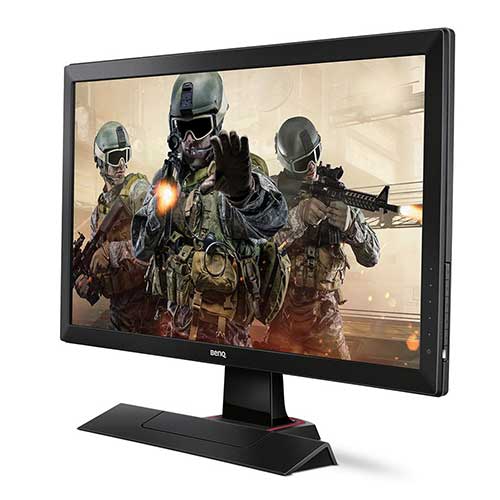
The Rl2455HM makes an amazing monitor for gaming due to it’s super low response times and reasonable contrast ratios. The display is ran by a TN panel and it even has some built-in speakers that you would be better off not using.

The sticker-price of an 24 inch RL2455HM is usually somewhere around $300, but due to a very recent price-drop at Amazon, you can get it new for $173+taxes.
[/cs_text][/cs_column][/cs_row][/cs_section][cs_section bg_color=”#ffffff” parallax=”false” separator_top_type=”none” separator_top_height=”50px” separator_top_inset=”0px” separator_top_angle_point=”50″ separator_bottom_type=”none” separator_bottom_height=”50px” separator_bottom_inset=”0px” separator_bottom_angle_point=”50″ _label=”Product Information” style=”margin: 0px;padding: 25px 0px;”][cs_row inner_container=”true” marginless_columns=”false” _label=”Row 1″ style=”margin: 0px auto;padding: 0px;”][cs_column fade=”false” fade_animation=”in” fade_animation_offset=”45px” fade_duration=”750″ _label=”2/3″ type=”2/3″ style=”padding: 0px;”][x_slider animation=”slide” slide_time=”5000″ slide_speed=”1000″ slideshow=”true” random=”false” control_nav=”false” prev_next_nav=”true” no_container=”true”][x_slide]

best gaming monitor under 200

[/x_slide][x_slide]

best gaming monitor under 200

[/x_slide][x_slide]

best gaming monitor under 200

[/x_slide][x_slide]

best gaming monitor under 200

[/x_slide][x_slide]

benq rl2455hm review

[/x_slide][/x_slider][/cs_column][cs_column fade=”false” fade_animation=”in” fade_animation_offset=”45px” fade_duration=”750″ _label=”1/3″ type=”1/3″ style=”padding: 0px;”][x_custom_headline level=”h1″ looks_like=”h3″ accent=”false”]BenQ RL2455HM[/x_custom_headline][x_line style=”border-top-width: 1px;width: 100%;”][x_skill_bar heading=”Color Quality” percent=”85%” bar_text=”” bar_bg_color=”#99e000″][x_gap size=”20px”][x_skill_bar heading=”Picture Quality” percent=”85%” bar_text=”” bar_bg_color=”#99e000″][x_gap size=”20px”][x_skill_bar heading=”Refresh/Response Rates” percent=”95%” bar_text=”” bar_bg_color=”#99e000″][x_line style=”border-top-width: 1px;width: 100%;”][x_counter num_start=”0″ num_end=”187″ num_speed=”1500″ num_prefix=”$” num_suffix=”.99″ num_color=”#3498db” text_above=”Lowest Price” text_below=”At Amazon” text_color=””][x_gap size=”20px”][x_button size=”large” block=”true” circle=”false” icon_only=”false” href=”https://www.amazon.com/s/ref=as_li_ss_tl?k=BenQ+24-Inch+Gaming+Monitor+-+LED+1080p+HD+Monitor+-+1ms+Response+Time+for+Ultra+Fast+Console+Gaming+(RL2455HM)&i=electronics&ref=nb_sb_noss&linkCode=ll2&tag=websitepcgame-20&linkId=572614478f3e4983f782f7473851a30c&language=en_US” title=”” target=”blank” info=”none” info_place=”top” info_trigger=”hover” info_content=””][x_icon type=”check”]Shop Now![/x_button][x_gap size=”45px”][/cs_column][/cs_row][/cs_section][cs_section parallax=”false” separator_top_type=”none” separator_top_height=”50px” separator_top_inset=”0px” separator_top_angle_point=”50″ separator_bottom_type=”none” separator_bottom_height=”50px” separator_bottom_inset=”0px” separator_bottom_angle_point=”50″ _label=”Section 6″ style=”margin: 0px;padding: 5px 0px 15px;”][cs_row inner_container=”true” marginless_columns=”false” _label=”Row 1″ style=”margin: 0px auto;padding: 0px;”][cs_column fade=”false” fade_animation=”in” fade_animation_offset=”45px” fade_duration=”750″ _label=”1/3″ type=”1/3″ style=”padding: 0px;”][x_custom_headline level=”h3″ looks_like=”h4″ accent=”true” style=”margin-top: -2px;color:#3498db;”]Pros[/x_custom_headline][cs_icon_list][cs_icon_list_item title=”Recent Price Drop” type=”check” link_enabled=”false” link_url=”#” link_new_tab=”false” _label=”Recent Price Drop”]Recent Price Drop[/cs_icon_list_item][cs_icon_list_item title=”60hz Refresh Rate” type=”check” link_enabled=”false” link_url=”#” link_new_tab=”false” _label=”60hz Refresh Rate”]60hz Refresh Rate[/cs_icon_list_item][cs_icon_list_item title=”1ms GTG Respond Rate” type=”check” link_enabled=”false” link_url=”#” link_new_tab=”false” _label=”1ms GTG Respond Rate”]1ms GTG Respond Rate[/cs_icon_list_item][cs_icon_list_item title=”No Flickering” type=”check” link_enabled=”false” link_url=”#” link_new_tab=”false” _label=”No Flickering”]No Flickering[/cs_icon_list_item][cs_icon_list_item title=”No Ghosting / Blur” type=”check” link_enabled=”false” link_url=”#” link_new_tab=”false” _label=”No Ghosting / Blur”]No Ghosting / Blur[/cs_icon_list_item][cs_icon_list_item title=”2 HDMI Ports” type=”check” link_enabled=”false” link_url=”#” link_new_tab=”false” _label=”2 HDMI Ports”]2 HDMI Ports[/cs_icon_list_item][cs_icon_list_item title=”Headphone + Mic Jacks” type=”check” link_enabled=”false” link_url=”#” link_new_tab=”false” _label=”Headphone + Mic Jacks”]Headphone + Mic Jacks[/cs_icon_list_item][/cs_icon_list][/cs_column][cs_column fade=”false” fade_animation=”in” fade_animation_offset=”45px” fade_duration=”750″ _label=”1/3″ type=”1/3″ style=”padding: 0px;”][x_custom_headline level=”h3″ looks_like=”h4″ accent=”true” style=”margin-top: -2px;color:#3498db;”]Cons[/x_custom_headline][cs_icon_list title=”Copy of undefined” _label=”Copy of undefined”][cs_icon_list_item title=”Crappy Built-in Speakers” type=”remove” link_enabled=”false” link_url=”#” link_new_tab=”false” _label=”Crappy Built-in Speakers”]Crappy Built-in Speakers[/cs_icon_list_item][/cs_icon_list][/cs_column][cs_column fade=”false” fade_animation=”in” fade_animation_offset=”45px” fade_duration=”750″ _label=”1/3″ type=”1/3″ style=”padding: 0px;”][x_custom_headline level=”h3″ looks_like=”h4″ accent=”true” style=”margin-top: -2px;color:#3498db;”]Summary[/x_custom_headline][cs_text]The BenQ RL2455HM is an amazing 1920×1080 gaming monitor, and with the recent price drop, you would be missing out big-time by not upgrading to it.[/cs_text][/cs_column][/cs_row][cs_row inner_container=”true” marginless_columns=”false” _label=”Row 2″ style=”margin: 0px auto;padding: 0px;”][cs_column fade=”false” fade_animation=”in” fade_animation_offset=”45px” fade_duration=”750″ _label=”1/1″ type=”1/1″ style=”padding: 0px;”][x_accordion][x_accordion_item title=”Click For Specs” open=”false”]

  • TN Panel
  • 1920 x 1080 Native Resolution
  • 60Hz Refresh Rate
  • 1MS Gray to Gray Respond Time
  • 1000:1 Static Contrast Ratio
  • 12,000,000:1 Dynamic Contrast Ratio
  • Built-In Speakers
  • 23″ + 27″ Models (27″ model is $350)

[/x_accordion_item][/x_accordion][/cs_column][/cs_row][/cs_section][cs_section parallax=”false” separator_top_type=”none” separator_top_height=”50px” separator_top_inset=”0px” separator_top_angle_point=”50″ separator_bottom_type=”none” separator_bottom_height=”50px” separator_bottom_inset=”0px” separator_bottom_angle_point=”50″ _label=”Body” style=”margin: 0px;padding: 5px 0px;”][cs_row inner_container=”true” marginless_columns=”false” _label=”Row 1″ style=”margin: 0px auto;padding: 0px;”][cs_column fade=”false” fade_animation=”in” fade_animation_offset=”45px” fade_duration=”750″ _label=”1/1″ type=”1/1″ style=”padding: 0px;”][x_custom_headline level=”h2″ looks_like=”h3″ accent=”true” style=”color:#3498db;”]The Details[/x_custom_headline][cs_text]

BenQ makes some of the best dedicated gaming monitors you can get, and the 24 inch RL2455HM is no exception.

Boasting a blazing fast 1ms gray-to-gray respond rate, a 60hz refresh rate, it basically eliminates any kind of input lag, like you’re currently experiencing.

It also has built-in speakers, but you should probably just avoid using them. Basically any review you read will mention the fact that the speakers are really the only downside to the RL2455HM.

However, as of now, it’s an older model. For better gaming monitors check out these posts on the best 240hz monitors and affordable monitors under $400.

[/cs_text][x_custom_headline level=”h3″ looks_like=”h4″ accent=”false” style=”color:#3498db;”]Design[/x_custom_headline][cs_text title=”Copy of undefined” _label=”Copy of undefined”]

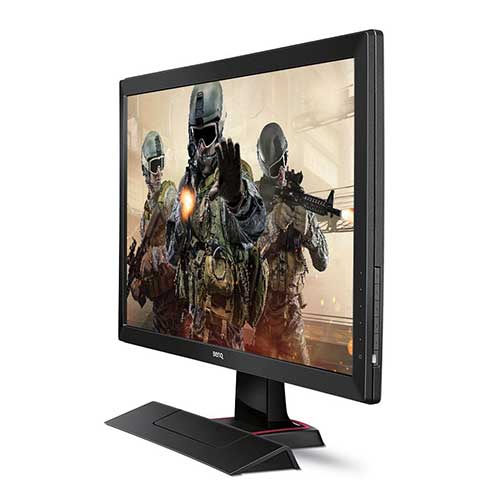
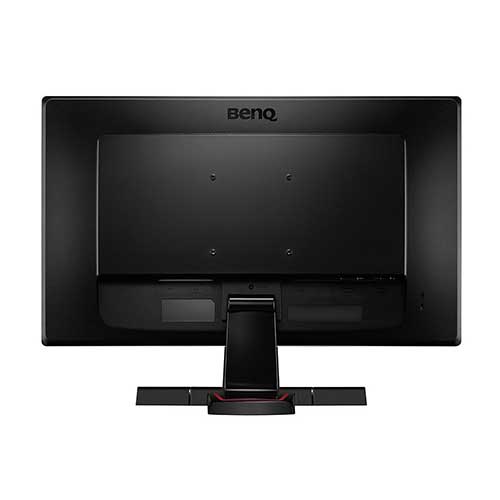
The overall design of the BenQ RL2455HM is really appealing, and the matte finish really adds a lot to it. It features all of the inputs you need, and then some, including DVI-DL, 2 HDMI ports, and both headphone and audio jacks.

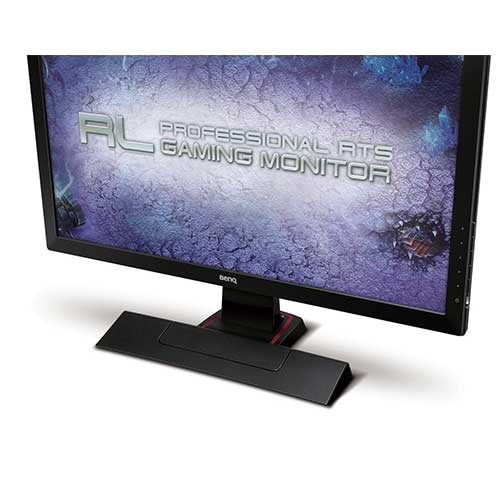
It feels nice and sturdy when the unit is put together, and the foot-print of the base is actually quite small. Personally, I kind of thought the base looked a bit like a vacuum head at first, but it grew on me over time.

All of the adjustment buttons are neatly tucked into the right side of the monitor so they’re not bumped, but they’re easy enough to intentionally press that you won’t accidentally break anything.

[/cs_text][cs_block_grid type=”three-up”][cs_block_grid_item title=”Block Grid Item 1″ _label=”Block Grid Item 1″]

benq rl2455hm review

[/cs_block_grid_item][cs_block_grid_item title=”Block Grid Item 2″ _label=”Block Grid Item 2″]

benq rl2455hm review

[/cs_block_grid_item][cs_block_grid_item title=”Block Grid Item 3″ _label=”Block Grid Item 3″]

benq rl2455hm review

[/cs_block_grid_item][/cs_block_grid][x_custom_headline level=”h3″ looks_like=”h4″ accent=”false” style=”color:#3498db;”]Performance[/x_custom_headline][cs_text title=”Copy of Copy of undefined” _label=”Copy of Copy of undefined”]

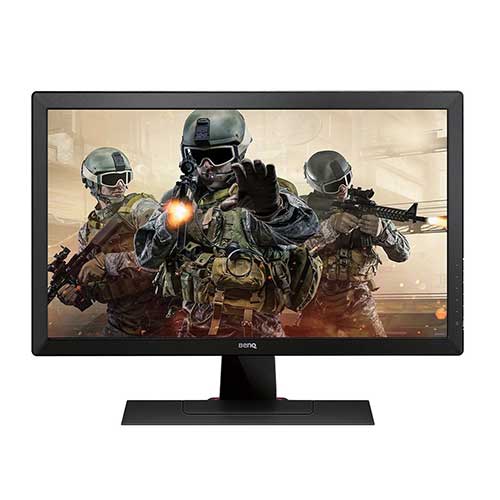
Although the BenQ uses a TN panel and not IPS or VA, the colors are surprisingly vivid and crisp. The 60hz refresh rate coupled with a GTG respond time of only 1ms mean this monitor has literally 0 input lag, which makes it amazing for gaming in general.

It supports resolutions up to 1920×1080 and has an extra HDMI ports just in case you want to plug something else into it, a console… would work… well…

The built-in speakers sounded like a good idea, when I first heard about it – ha, get it? But it quickly became apparent that my HTC M8 produces better sound quality, and it’s a cellphone.. But hey, some sound is better than no sound, right?

The RL2455HM also uses significantly less power than your conventional 24″ LED-lit affordable monitors, but LEDs already use such little power, that you probably wouldn’t even notice the difference (unless you have 10 or something).

It features 1000:1 static contrast ratio, and 12,000,000:1 dynamic contrast ratio, which is incredible. At this price-point, the RL2455HM outperforms everything else, and there isn’t much else to say about that.

[/cs_text][x_custom_headline level=”h3″ looks_like=”h4″ accent=”false” style=”color:#3498db;”]Accessories and Extras[/x_custom_headline][cs_text title=”Copy of Copy of Copy of undefined” _label=”Copy of Copy of Copy of undefined”]The RL2455HM comes with everything you’ll need to set it up and get to gaming. Everything but an HDMI cable, but that should be obvious. It comes with

The unit ships in 3 core pieces which you have to put together, the base, the upright arm, and the monitor. It’s a pretty simple process that will take about 35.5 seconds. From there it’s plug & play.[/cs_text][x_custom_headline level=”h2″ looks_like=”h3″ accent=”true” style=”color:#3498db;”]Conclusion[/x_custom_headline][/cs_column][/cs_row][/cs_section][cs_section parallax=”false” separator_top_type=”none” separator_top_height=”50px” separator_top_inset=”0px” separator_top_angle_point=”50″ separator_bottom_type=”none” separator_bottom_height=”50px” separator_bottom_inset=”0px” separator_bottom_angle_point=”50″ _label=”Desktop CTA” style=”margin: 0px;padding: 5px 0px 1px;”][cs_row inner_container=”true” marginless_columns=”false” _label=”Row 1″ style=”margin: 0px auto;padding: 0px;”][cs_column fade=”false” fade_animation=”in” fade_animation_offset=”45px” fade_duration=”750″ _label=”1/1″ type=”1/1″ style=”padding: 0px;”][cs_text title=”Copy of undefined” _label=”Copy of undefined”]If you need a good gaming monitor for under $200, that you can also use for literally anything else, including watching TV, the BenQ RL2455HM 24 inch has you covered.

With it’s blazing fast 1ms gray-to-gray respond time, and 60hz refresh rate, input lag is a thing of the past.

All-in-all, the RL2455HM is most-likely the best gaming monitor you will get for under $200. [/cs_text][x_callout title=”BenQ RL2455HM 24 inch<br> Gaming Monitor” message=”Best 1080 Gaming Monitor<br> for Under $200″ type=”center” button_text=”Get Yours!” circle=”false” button_icon=”thumbs-up” href=”https://www.amazon.com/s/ref=as_li_ss_tl?k=BenQ+24-Inch+Gaming+Monitor+-+LED+1080p+HD+Monitor+-+1ms+Response+Time+for+Ultra+Fast+Console+Gaming+(RL2455HM)&i=electronics&ref=nb_sb_noss&linkCode=ll2&tag=websitepcgame-20&linkId=572614478f3e4983f782f7473851a30c&language=en_US” href_title=”” target=”blank” style=”color:#3498db;”][/cs_column][/cs_row][/cs_section][cs_section parallax=”false” separator_top_type=”none” separator_top_height=”50px” separator_top_inset=”0px” separator_top_angle_point=”50″ separator_bottom_type=”none” separator_bottom_height=”50px” separator_bottom_inset=”0px” separator_bottom_angle_point=”50″ _label=”Mobile CTA” style=”margin: 0px;padding: 5px 0px 45px;”][cs_row inner_container=”true” marginless_columns=”false” _label=”Row 1″ style=”margin: 0px auto;padding: 0px;”][cs_column fade=”false” fade_animation=”in” fade_animation_offset=”45px” fade_duration=”750″ _label=”1/1″ type=”1/1″ style=”padding: 0px;”][x_creative_cta padding=”25px 25px 25px 25px” text=”Tap Here<br>To Get Yours!” font_size=”36px” icon=”thumbs-up” icon_size=”48px” animation=”slide-top” link=”http://amzn.to/1GT2Mw2″ color=”” bg_color=”#3498db” bg_color_hover=”#0083db”][/cs_column][/cs_row][/cs_section][/cs_content]

0 0 votes
Article Rating

0 Comments
guest
0 Comments
Inline Feedbacks
View all comments

Related Articles

Best $1200 1440p Gaming PC Build for 2026

Best $1200 1440p Gaming PC Build for 2026 The $1200 budget in 2026 is the sweet spot for serious 1440p gaming. You get enough headroom for a genuinely capable GPU like the RTX 4070 or RX 7800 XT, paired with a Ryzen 7 7700X that won't bottleneck it. The result is a...

Best $1200 1440p Gaming PC Build for 2026

Best $1200 1440p Gaming PC Build for 2026 The $1200 budget in 2026 is the sweet spot for serious 1440p gaming. You get enough headroom for a genuinely capable GPU like the RTX 4070 or RX 7800 XT, paired with a Ryzen 7 7700X that won't bottleneck it. The result is a...